General
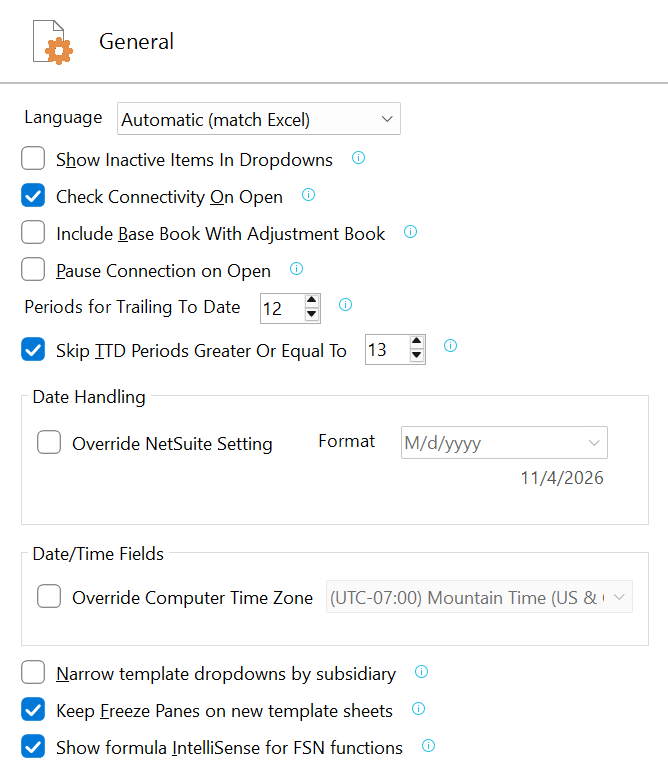
The General pane is one of the panes in the Finsyte Preferences dialog, opened from Help > Preferences in the Finsyte ribbon.
| Option | Description | Default |
|---|---|---|
| Show Inactive Items In Dropdowns | Determines if list items marked Inactive will be included as valid options for selection in a dropdown. Easily review List data to understand if a field is marked Inactive. | Unchecked |
| Include Base Book With Adjustment Book | When adjustment-only books are queries, checking this option will include the base book values. | Unchecked |
| Check Connectivity On Open | Contacts NetSuite immediately when opening a workbook to validate that the connection is available and that the authentication token is valid. | Checked |
| Pause Connection on Open | When checked, calculations will be paused initially when Excel is opened. | Unchecked |
| Periods for Trailing to Date | The number of periods to utilize for the TTD period range. | 12 periods |
| Skip TTD Periods Greater Or Equal To | When checked, TTD period range calculations will skip any periods greater than or equal to the amount selected. | Checked, 13 |
| Date Handling | Select the check box to override NetSuite's date settings for your instance of Excel. | |
| Narrow Template Dropdowns by Subsidiary | Allows a template to filter optional segment dropdowns based on the subsidiary selection | Unchecked |
| Keep Freeze Panes on new template sheets | Keeps header rows and first columns in view as you scroll, on new sheets from templates that freeze them, such as the report templates and Bulk Records sheets. Clear the check box to scroll the whole sheet on new template sheets. Sheets already in a workbook keep their panes as they are. The Journal Entry, Intercompany Journal Entry, and Expense Report templates open without frozen panes either way. Takes effect on Save, without restarting Excel. | Checked |
| Show formula IntelliSense for FSN functions | Shows the function description and argument help while you type an FSN formula in a cell. Clear the check box to improve performance in very large workbooks. FSN formulas calculate the same with the check box cleared. The Function Arguments dialog still shows the argument names and help for each FSN function. Takes effect on Save, without restarting Excel. | Checked |