NetSuite Trial Balance in Excel
A NetSuite trial balance in Excel, flat or grouped by your chart of accounts, with a live Total row that confirms every account is on the sheet.
Screen recording in Excel with on-screen captions. Caption 1: Insert the trial balance. On the Finsyte ribbon, Standard Reports › Trial Balance offers Trial Balance, Grouped Trial Balance, Comparative Trial Balance and Comparative Grouped Trial Balance; Grouped Trial Balance adds a Trial Balance sheet with a parameter block at the top. Caption 2: Set the subsidiary and period. Subsidiary is set to Headquarters, Fiscal Year to FY 2025, Period Number to 12 and Period Range to YTD, and the title line updates to As of December 31, 2025. Caption 3: Load Accounts. Load Accounts on the ribbon fills the sheet with the account tree under a Headquarters (Consolidated) column. Caption 4: Add a column per subsidiary. Column D is copied to column E and E’s Subsidiary is changed to United States, and the new column recalculates on its own. Caption 5: Check the Total row. At the bottom, Liabilities & Equity is 13,603,089 for Headquarters (Consolidated) and 5,828,194 for United States, and the Total row is zero in both columns.
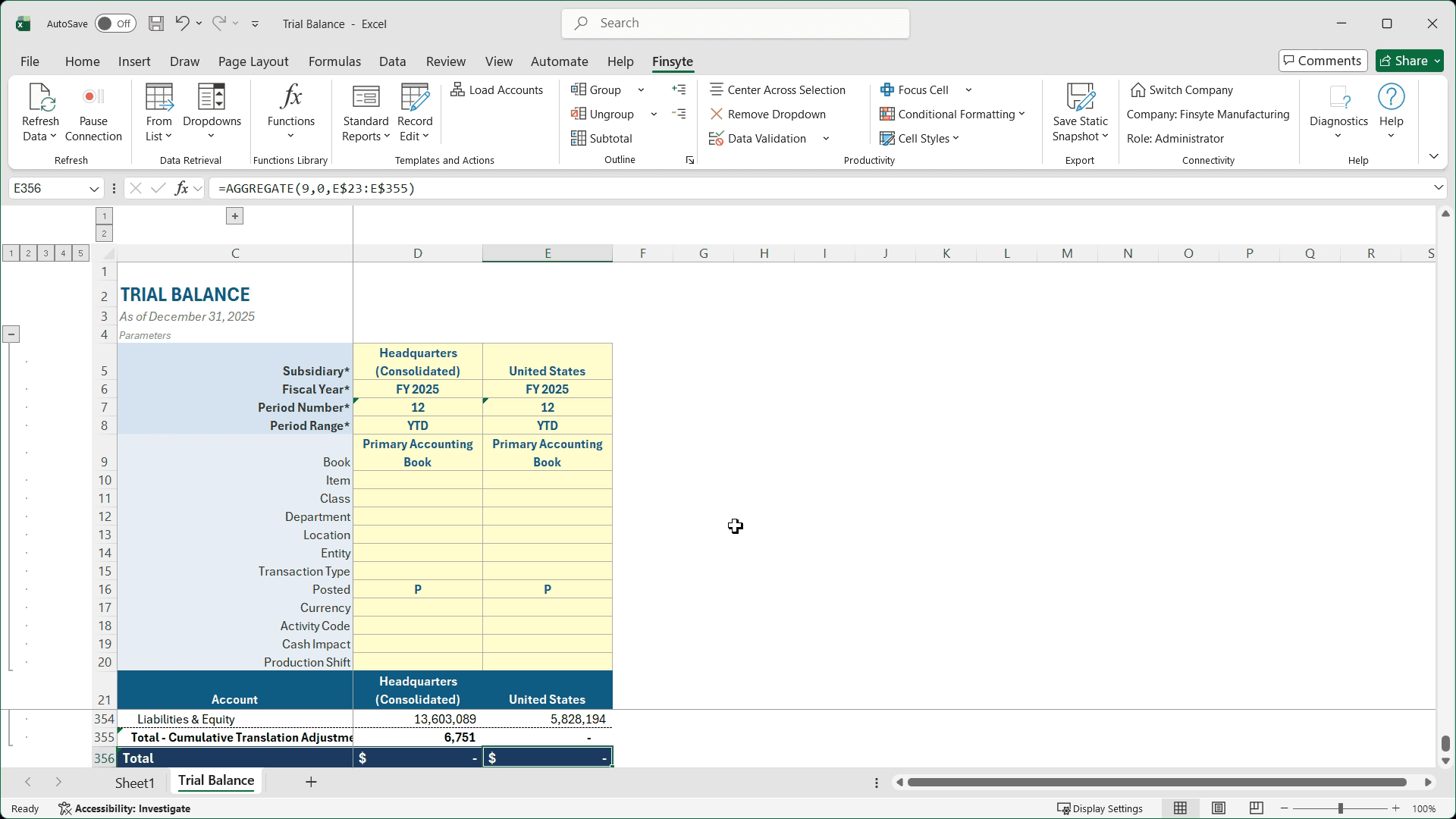
Every NetSuite account in one sheet, with a live Total row
Load Accounts returns the accounts for your subsidiary, balance sheet and income statement alike, each with a live balance from NetSuite. The Total row nets to zero when every account with a balance is on the sheet.
- Two layouts: a flat account list, or grouped by your NetSuite chart of accounts with collapsible outline levels
- Balance sheet and income statement accounts together, each from the purpose-built GLAccountBalance function
- A Total row that nets to zero, confirming every account with a balance is on the sheet
- A Cumulative Translation Adjustment for subsidiaries in other currencies, calculated the way NetSuite does
- Drill down from any balance to the transactions behind it
A static snapshot of a finished trial balance, so you can see the layout before you connect NetSuite.
From a blank sheet to a NetSuite trial balance in four steps
Choose a layout
On the Finsyte ribbon, choose Standard Reports › Trial Balance, then Trial Balance for a flat list or Grouped Trial Balance for your chart of accounts.
Set the parameters
Pick the Subsidiary, Fiscal Year, Period Number and Period Range. YTD gives the trial balance as of the end of that period.
Load Accounts
Finsyte returns every account for that subsidiary with its balance, followed by the Total row.
Check the Total row
Scroll to the Total row to confirm it nets to zero, and use Refresh Data whenever the books change.
A NetSuite trial balance by month or by subsidiary
Each balance is its own formula reading the parameters above its column, so a copied column works on its own. That makes the trial balance easy to lay out across months or entities.
Flat or grouped
The Trial Balance layout is a plain account list, ready to sort, filter or carry into a reconciliation. The Grouped Trial Balance organizes the same accounts by your NetSuite chart of accounts, with Excel outline levels so each group collapses to its total. Both layouts use the same parameters, the same balances and the same Total row.
By month
Set Period Range to YTD to get the trial balance as of the end of the period you pick: balance sheet accounts as balances, income statement accounts as year-to-date activity. For a trial balance by month, duplicate the balance column and change only the Period Number in each copy. Twelve columns give you each month-end of the year, each one live. Each column keeps its own Period Number, so changing one month never touches the others.
By subsidiary
Start from the top-level (Consolidated) subsidiary and Load Accounts brings in every account you have. Then copy the balance column once per subsidiary and change the Subsidiary at the top of each copy; the docs walk through four subsidiaries side by side this way. Accounts a subsidiary doesn’t use show 0.
Local currency or the parent’s, on one sheet
A subsidiary’s column shows its own currency by default. Set the column’s Currency to the top-level parent’s currency and the same balances appear in that currency instead. NetSuite translates them at its own exchange rates, so they match its reports. A NetSuite report shows all its values in the one currency you pick for it. Finsyte works cell by cell, so one trial balance can show each subsidiary in its local currency beside the same accounts in the parent’s currency.
Any segment, any combination
Location and your custom segments, such as Activity Code, are parameters on every column. Set one for a trial balance by location, or combine several in one column. A segment view needs that segment on your balance sheet postings, not only on income and expenses. Choose which parameters appear in Template Parameters.
A Total row that confirms the sheet is complete
NetSuite posts every transaction in balance, so the Total row is a completeness check. Account signs aren’t reversed, and the total nets to zero when every account with a balance is on the sheet. The template lists active accounts, so a total other than zero points to an account that’s missing, such as one made inactive while it still held a balance.
Consolidation translates balance sheet accounts at the period-end rate, income statement accounts at the average rate and equity at historical rates, and those don’t net to zero. The Cumulative Translation Adjustment carries the difference, calculated the way NetSuite does, and is included in the total. For a single entity in its own currency, it’s zero.
Drill into any balance
Right-click a balance and choose Drill Down. A new sheet breaks that number down by subsidiary, period, department, class, location or entity, or lists the transaction lines behind it, all within the same parameters as the cell. It’s the quickest way to trace an account that won’t tie.
Compare two periods
A trial balance with two periods side by side, plus Variance and % Variance columns, has its own template. See the comparative trial balance.
It’s Excel, so make the trial balance yours
The template gets you started. In Excel, you make it your own: every balance is a cell formula, so you can add columns for adjustments, mappings or reconciliation notes beside it. A refresh updates the balances, and your work around them stays put.
- Adjusting entries and a final balance column
- Mappings to your reporting lines
- Reconciliation notes and tick marks
- A month or subsidiary per column
- Your own filters and sorting
NetSuite trial balance in Excel: FAQ
- QHow do I run a trial balance by month from NetSuite in Excel?
- Insert the Finsyte Trial Balance template, set Period Range to YTD, and choose Load Accounts. Then duplicate the balance column once per month, changing only the Period Number. Every column stays connected to NetSuite.
- QCan I see the trial balance for each subsidiary side by side?
- Yes. Start from the top-level (Consolidated) subsidiary when you load accounts, then copy the balance column once per subsidiary and change the Subsidiary in each. Each cell works independently, and accounts a subsidiary doesn’t use show 0. A column shows its subsidiary’s own currency, or the top-level parent’s when you set its Currency.
- QWhat’s the difference between the flat and grouped trial balance?
- The flat Trial Balance is a plain list of accounts and balances. The Grouped Trial Balance organizes the same accounts by your NetSuite chart of accounts, with subtotals and outline levels you can collapse.
- QHow do I refresh the trial balance after the books change?
- Use Refresh Data on the Finsyte ribbon for the current sheet or the whole workbook, or right-click a range and choose Refresh Selection. The balances and the Total row update in place.
- QWhy is there a Cumulative Translation Adjustment line?
- Consolidation translates balance sheet accounts at the period-end rate, income statement accounts at the average rate and equity at historical rates, and those don’t net to zero. The Cumulative Translation Adjustment carries the difference, calculated the way NetSuite does, so the consolidated trial balance still totals zero. For a single entity in its own currency, it’s zero.
Try the trial balance template with your own NetSuite data
30-day free trial with every Finsyte template included. No credit card required.