Drilldown Functions
Definition
The drilldown functions return the detail behind a Finsyte balance as a dynamic array that spills below the cell and refreshes with the workbook. After their own leading arguments they take the same arguments as GLAccountBalance, so an existing =FSN.GLAccountBalance(...) formula becomes a breakdown by inserting the leading arguments at the front.
| Function | Returns | Arguments |
|---|---|---|
| SegmentDrilldown | A balance, debit, credit or item quantity broken down by a segment, one row per segment value | Segment, Balance Type, then the GLAccountBalance arguments |
| TransactionLineDrilldown | The transaction lines behind a balance, debit or credit; journal entry lines for a statistical account | Balance Type, then the GLAccountBalance arguments |
| AgingSummary | Accounts receivable or accounts payable aging, one row per customer or vendor with a column per bucket; the account decides which | The GLAccountBalance arguments |
The Segment Argument
| Segment | Rows |
|---|---|
| Department, Class, Location, Subsidiary, Transaction Type, Entity, Item | One row per value of that segment |
| Period | One row per period in the range. On a balance sheet account with a YTD Period Range, a Prior Year's Balance row comes first with the balance from earlier years, so the rows add up to the balance. Quantity works the same way. |
| Account | One row per base account behind a summary account, a net income or retained earnings account, or a ^-joined list of accounts |
| A custom segment name | One row per value of that custom segment |
Segment values are not case-sensitive. The Dropdowns menu on the ribbon has a Segment entry that writes a cell dropdown of the values available in your account; point the Segment argument at that cell.
The Balance Type Argument
| Balance Type | Amount shown | Same as |
|---|---|---|
| Balance, or blank | The account balance | GLAccountBalance |
| Debit | The debit side only | GLAccountDebitBalance |
| Credit | The credit side only | GLAccountCreditBalance |
| Quantity (SegmentDrilldown only) | The item quantity; Currency is ignored | GLItemQuantity |
Example
With the subsidiary in B2, the fiscal year in B3, the period number in B4 and the account in B5:
=FSN.SegmentDrilldown("Department", "Balance", B2, B3, B4, "YTD", B5)
returns a header row and one row per department with its balance. =FSN.TransactionLineDrilldown("Balance", B2, B3, B4, "YTD", B5) returns the transaction lines behind the same balance, in the columns chosen under Preferences > Drilldown Options. =FSN.AgingSummary(B2, B3, B4, "YTD", B5) returns the aging when B5 is an accounts receivable or accounts payable account.
How Results Look
Once a result is on the sheet, Finsyte formats it like a drilldown table. The formatting follows the result as it grows and shrinks.
- The header row is bold with borders, and alternate rows are shaded.
- The header row has filter buttons. Excel cannot sort a spilled result, so sorting from a filter button shows "You can't change part of an array." A worksheet has only one filter, so when a sheet holds more than one drilldown function, only the first gets filter buttons.
- Cells that name a NetSuite record are links that open the record: on a TransactionLineDrilldown row, the Transaction Name, Created From, Transaction Entity, Line Entity Name and Item; on an Entity or Item breakdown, the entity or item; on an aging row, the customer or vendor; and on a statistical account's journal entry lines, the journal entry. Links are added to the first 5,000 rows, up to 10,000 links. To leave them out, clear Add NetSuite links to drilldown rows in Drilldown Options.
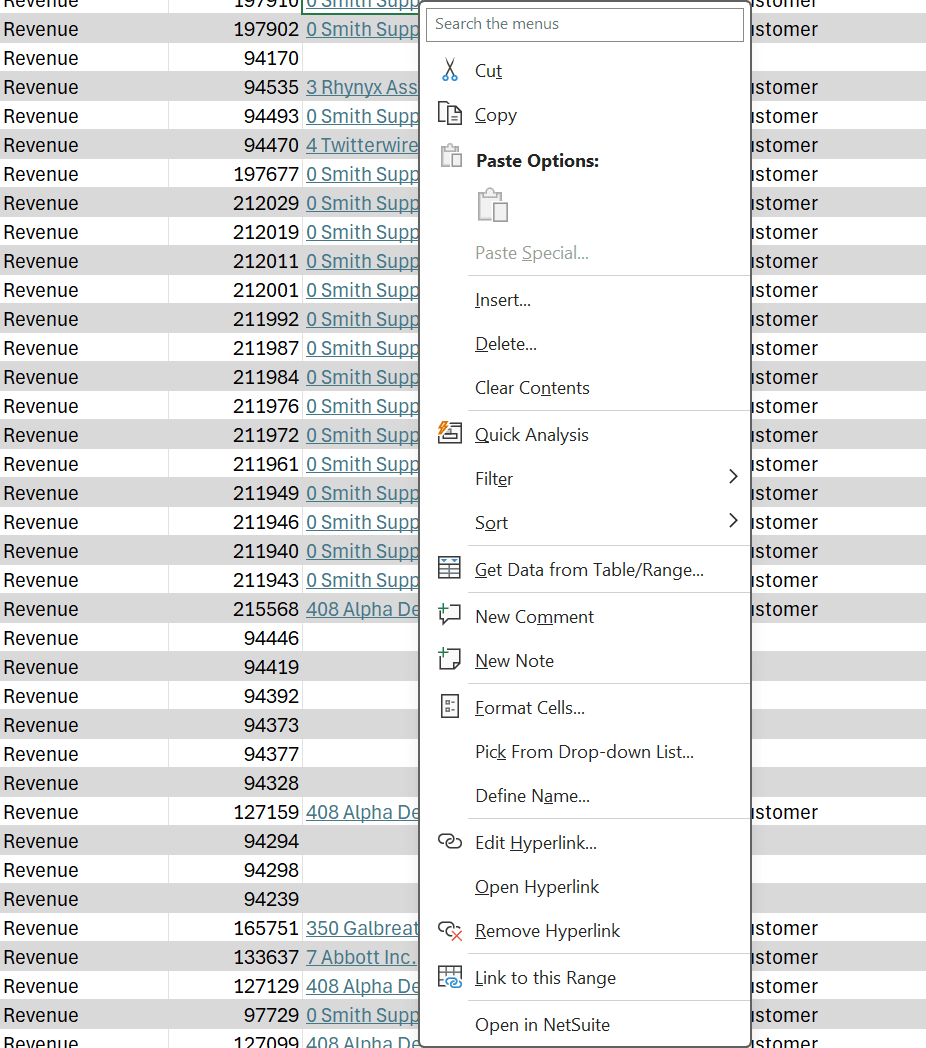
- Right-click a cell in a row that has a NetSuite record and choose Open in NetSuite. A linked cell opens its own record; any other cell opens the row's transaction, or the row's first link when it has no transaction. This works on every row, including rows after the first 5,000 and with links turned off.
A drilldown function you type has no Total row. Dynamic drill down sheets add one below the results, after a blank row; see Static and Dynamic Drill Down Sheets.
Drilling into a row
Right-click an amount inside a SegmentDrilldown or AgingSummary result and the Drill Down menu offers the same drilldowns a GL balance cell gets, applied to that row: the department, class, location, period, base account, custom segment value, or the aging row's customer or vendor. The Drilldown style setting in Drilldown Options decides whether this writes a dynamic sheet holding another drilldown function, the default, or a static drilldown sheet; see Static and Dynamic Drill Down Sheets.
Rows of a TransactionLineDrilldown are transaction lines and offer no further drilldown. Right-click one and choose Open in NetSuite to open its transaction, or right-click a linked cell, such as the entity or item, to open that record.
Remarks
- The result layout matches the right-click drilldown sheets: the same columns.
- Dates are real dates and amounts carry a number format once the result is on the sheet; period names stay text.
- Amounts are unsigned, as in the right-click drilldown sheets.
- Breaking a statistical account down by segment is not available; TransactionLineDrilldown returns its journal entry lines.
- Quantity supports the built-in segments and Period. Custom segments and Account are not available for quantities.
- Account requires a summary account, a net income or retained earnings account, or a
^-joined account list. A single base account shows "Account needs a summary account or a list of accounts." - AgingSummary needs an accounts receivable or accounts payable account; a
^-joined list must be all one type. The aging is as of the end of the period; Period Range is ignored. - Results are cached like other Finsyte functions. Refresh Data re-queries them; Refresh Selection re-queries a drilldown when the cell holding the formula is selected (the spilled cells below it hold no formula). Static Snapshot Selection replaces the spill with its values and keeps its links, filter, banding and any Total row.
- A drilldown cancelled from the ribbon, or one that times out, shows "Not loaded: the drilldown was cancelled or timed out before all its lines loaded. Use Refresh Selection or Refresh Data to load it again." A static Drill Down cancelled the same way writes no sheet.
- A drilldown with more lines than the number in Drilldown Options, 50,000 by default, shows a Large Drilldown message. Every line still loads.
- Deleting or moving a drilldown function leaves its links and filter buttons on the cells it used.
- Switch Sign does not apply to these cells.
- Pass ranges as references. A workbook name typed as text (for example
"RevenueAccounts") is not expanded the way the scalar functions expand it; reference the named range itself instead.