NetSuite Balance Sheet in Excel
Pull assets, liabilities and equity from NetSuite into a formatted Excel balance sheet that stays connected, so next month’s numbers are one refresh away.
Silent screen recording in Excel. On the Finsyte ribbon, Standard Reports › Balance Sheet › Balance Sheet adds a Balance Sheet sheet with a parameter block at the top. Subsidiary is set to (Consolidated), Fiscal Year to FY 2025, Period Number to 12, and Period Range to YTD, chosen from a list of ITD, YTD, RTD, QTD, PTD and TTD. Book stays on Primary Accounting Book. The title line updates to As of December 31, 2025. Load Accounts on the ribbon collapses the parameters and fills the sheet with the account tree: Assets, split into Current Assets and Long Term Assets, then Liabilities & Equity. Balances and subtotals fill the Headquarters (Consolidated) column, and scrolling down shows Total - Liabilities & Equity of $22,015,833, the same as Total - Assets.
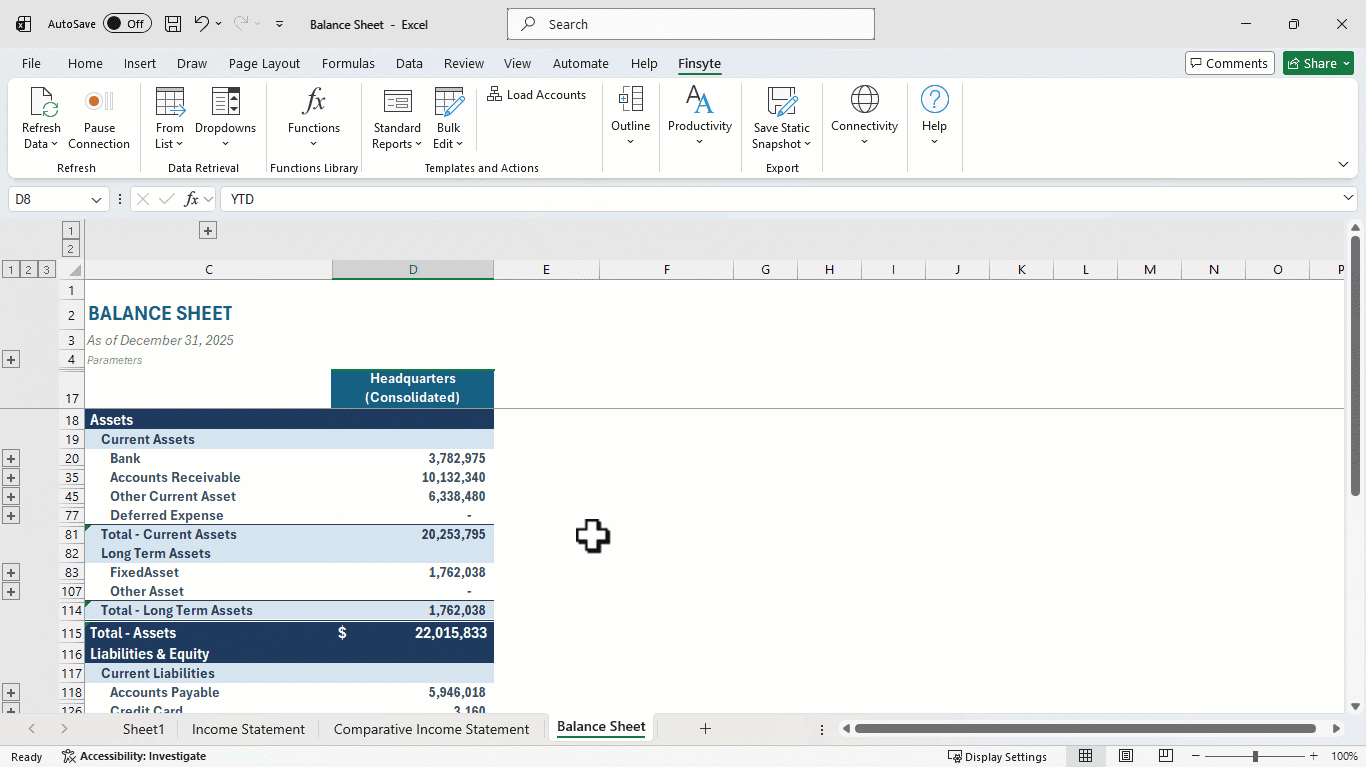
A NetSuite balance sheet built from your own chart of accounts
Load Accounts reads your account hierarchy from NetSuite, so the sheet starts with your real accounts, grouped the way NetSuite groups them. Every amount is a live formula, not a pasted value.
- A live balance in every cell, from the purpose-built GLAccountBalance function
- A collapsible account tree: show the summary for the board or the detail for the close
- Drill down from any balance to the transactions behind it
- Subtotals that total like a printed balance sheet, with Liabilities & Equity sign-reversed and Retained Earnings and Net Income added under Equity
- Formatted and ready to share, with the title, as-of date and subsidiary heading filled in
A static snapshot of a finished balance sheet, so you can see the layout before you connect NetSuite.
From a blank sheet to a NetSuite balance sheet in four steps
Insert the template
On the Finsyte ribbon, choose Standard Reports › Balance Sheet › Balance Sheet. A new Balance Sheet sheet opens with its parameters at the top.
Set the parameters
Pick the Subsidiary, Fiscal Year, Period Number and Period Range. Book defaults to your first accounting book, and the other filters are optional.
Load Accounts
Finsyte returns every balance sheet account for that subsidiary, in NetSuite’s hierarchy, with balances and subtotals.
Refresh when the books change
Use Refresh Data after new postings. The balances update in place, and so does everything you built around them.
A NetSuite balance sheet by month, by period or by subsidiary
The parameters sit above the balance column, and every balance in that column reads from them. Change a parameter and the formulas in that column recalculate automatically.
By month or accounting period
Period Number picks the accounting period, and Period Range sets the span. For a monthly balance sheet, set Period Range to YTD. On balance sheet accounts, YTD returns the balance as of the period end, and it keeps prior years’ earnings in Retained Earnings and this year’s in Net Income. Then duplicate the balance column and change only the Period Number in each copy. Twelve columns give you every month-end of the year, each one live.
By subsidiary, or consolidated
Set Subsidiary to one entity for its own balance sheet, or pick its (Consolidated) entry to roll up that subsidiary and every subsidiary below it.
Start from the top-level (Consolidated) subsidiary and Load Accounts brings in every account you have. To compare entities side by side, copy the column for each one and change its Subsidiary. Accounts an entity doesn’t use show 0.
Local currency or the parent’s, on one sheet
A subsidiary’s column shows its own currency by default. Set the column’s Currency to the top-level parent’s currency and the same balances appear in that currency instead. NetSuite translates them at its own exchange rates, so they match its reports. A NetSuite report shows all its values in the one currency you pick for it. Finsyte works cell by cell, so one sheet can hold a UK subsidiary in pounds beside the same balances in dollars, or every subsidiary in the parent’s currency.
Read it at any level
Load Accounts adds an Excel outline group at every level of the account tree. Collapse to Assets and Liabilities & Equity for a board summary, or open a group to every bank account for the close. A collapsed group shows its total in place, so the summary still adds up.
Break a balance down by subsidiary or period
Right-click any balance and choose Drill Down. A new sheet breaks that one number down by subsidiary, period, department, class, location or entity, or lists the transaction lines behind it, all within the same parameters as the cell. For a balance sheet account at YTD, the first row is the balance brought forward from the prior year.
Any segment, any combination
Location and your custom segments, such as Activity Code, are parameters on every column. Set one for a balance sheet by location, or combine several in one column. A segment view needs that segment on your balance sheet postings, not only on income and expenses. Choose which parameters appear in Template Parameters. Book, Item, Entity, Transaction Type, Posted and Currency filter a column the same way.
Compare this year to last year
A balance sheet with two years side by side, plus Variance and % Variance columns, has its own template. See the comparative balance sheet.
It’s Excel, so make the balance sheet yours
The template gets you started. In Excel, you make it your own: every balance is a cell formula, so you can add columns, ratios and formatting around them. A refresh updates the balances, and your own calculations follow. The layout uses Excel cell styles, one per level, so restyling a level restyles the whole sheet.
- Current ratio and working capital
- Prior-month and prior-year columns
- Your own number formats and styles
- Charts that update on refresh
- Notes for the board pack
NetSuite balance sheet in Excel: FAQ
- QHow do I create a monthly balance sheet from NetSuite in Excel?
- Insert the Finsyte Balance Sheet template, set Period Range to YTD so each column shows balances as of the period end, and choose Load Accounts. Then duplicate the balance column once per month, changing only the Period Number. Every column stays connected to NetSuite.
- QCan I run the balance sheet for one subsidiary, or consolidated?
- Both. Pick a subsidiary on its own, or its (Consolidated) entry to roll up that subsidiary and every subsidiary below it. For a consolidated report, start with the top-level (Consolidated) subsidiary so Load Accounts brings in every account possible.
- QCan I change the layout, like putting each subsidiary in its own column?
- Yes. Every cell is its own formula and works independently, so you can arrange and format the report however you want. Give each subsidiary its own column, in its own currency or the parent’s, group several under a parent’s (Consolidated) entry, or add rows and columns of your own. It’s Excel, so the layout is yours.
- QHow do I compare this year’s balance sheet to last year’s?
- Use the Comparative Balance Sheet template. You set the fiscal year for each of its two columns, and Variance and % Variance columns calculate the change between them.
- QCan I drill into an account balance to see the transactions behind it?
- Yes. Right-click a balance and choose Drill Down to open the detail by subsidiary, period, segment or transaction line on a new sheet, with a link back to the cell you started from.
- QDo I need any extra NetSuite modules?
- No extra NetSuite modules are required. The template runs on Finsyte’s connection to your NetSuite account.
Try the balance sheet template with your own NetSuite data
30-day free trial with every Finsyte template included. No credit card required.