SubHasAccess Function
Description
The SubHasAccess function is one that is utilized inside of the GL Accounts List that can be returned by selecting From List > GL Accounts. This function makes it easy to select a Subsidiary and identify if a list item, like GL Account Number, is accessible under that subsidiary in NetSuite.
Function Arguments
| Argument Name | Input Information |
|---|---|
| Subsidiary | Subsidiary Name either from a cell reference or typed |
| List Name | The exact name of a list found in the From List dropdown in data retrieval |
| Name/Number/Identifier | Determines whether or not a particular subsidiary has access to a list item, such as GL account |
Remarks
This function is most commonly used inside of the GL Accounts list. Review the documentation on Subsidiary Has Access within the Data Retrieval information for more information.
Example
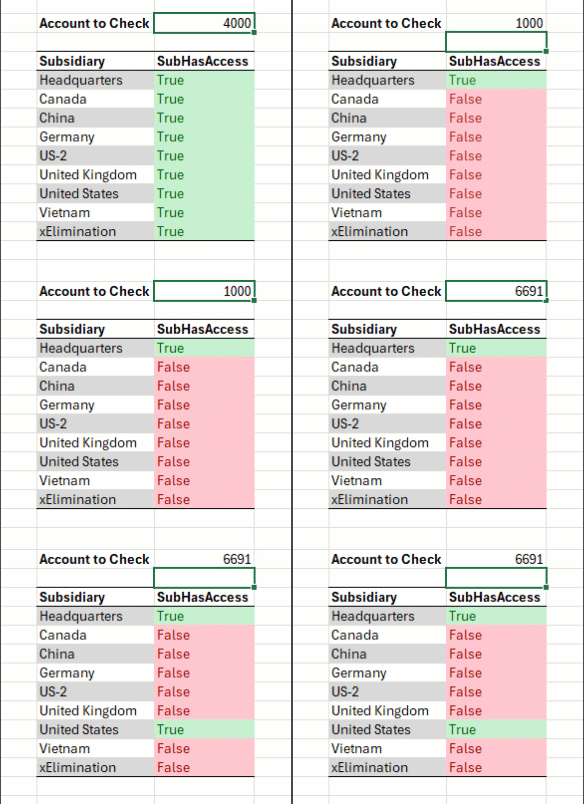
If a user wanted to return True or False for each Subsidiary based on which account they are looking at, they can utilize the SubHasAccess function.
- Select Finsyte Functions > SubHasAccess
- Select the Subsidiary name, type in GL Accounts as the list name and choose the Account ID you are wanting to check. Use the F4 key as needed for accurate column referencing.
- In this example, updating the Account to Check value will re-evaluate if each Subsidiary has access to that account information.