
NetSuite is a powerful system of record — it captures every transaction, manages every close, and holds the financial data your organization runs on. The challenge isn't the data. It's getting that data into the formats, layouts, and models your FP&A team needs to move fast.
That's where Excel comes in. Finance teams have always done their best analytical work there — building models, running scenarios, structuring presentations. Finsyte connects the two, pulling live NetSuite actuals directly into Excel cells so your team spends less time moving data and more time working with it.
How Finsyte Fits Into the FP&A Workflow End-to-End
Finsyte is a NetSuite Excel add-in built specifically for finance and accounting teams. It extends what NetSuite already does well — storing accurate, audit-ready financial data — by making that data instantly accessible in Excel, the tool your team already uses every day. No ODBC setup, no extra NetSuite modules, no manual exports. NetSuite data lives in individual Excel cells via Finsyte functions, refreshable with a single click.
Here's what that looks like across the FP&A cycle:
Building the budget. Finsyte's Budget Management template downloads your current NetSuite budgets directly into Excel, with actuals displayed alongside for immediate context. Edit figures, model revisions, and upload the updated budget back to NetSuite when you're ready — no separate module, no re-entry. For ongoing performance tracking, the Budget vs. Actual template handles variance analysis with over/under flagging built in.
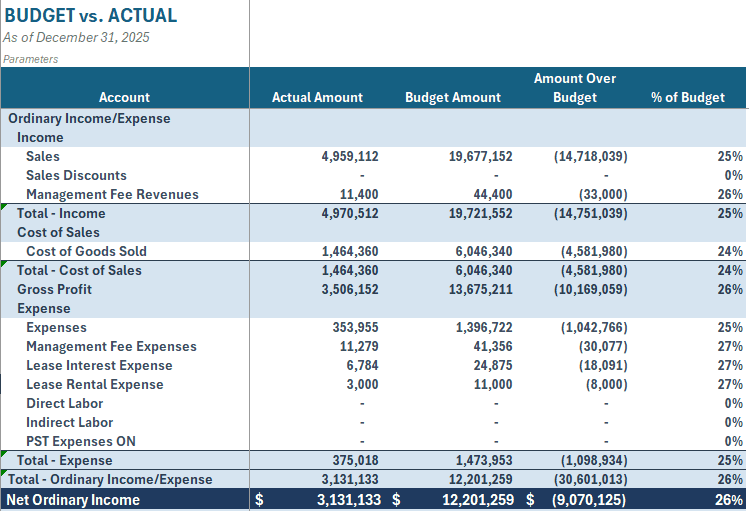
Running variance analysis. Because actuals flow directly into Excel cells as live NetSuite data, your variance formulas always reference current figures. Refresh once and every cell updates — income statement, departmental breakdowns, and any custom segment slices your business tracks — giving your team the speed to iterate and present with confidence.
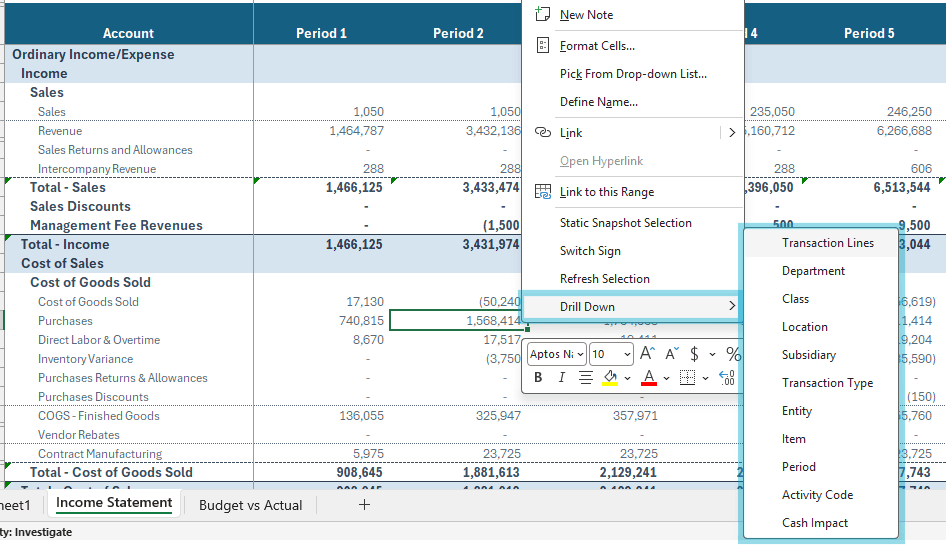
Drilling into the details. When a variance flags something worth investigating, you don't need to leave Excel to find the answer. Finsyte's drill down opens a new worksheet directly in your workbook — breaking down any figure by subsidiary, department, location, or transaction lines. Drill all the way to the individual transaction level, with links that open the original NetSuite entry directly. Audit questions get answered in minutes, not days.
Delivering the output. When analysis is complete, Finsyte generates polished reports that can be shared with stakeholders who don't have NetSuite access. The workflow goes from actuals to insight to deliverable without leaving Excel. And because that data is sensitive, security is built into the process — Finsyte ensures financial workbooks stay protected at every step, from analysis through distribution.
Live Actuals in Excel Cells — Not Just a Refreshable Table
Most finance professionals have worked with tools that push data into Excel as a refreshable table. Finsyte's architecture is different. Actuals land in individual Excel cells via purpose-built functions — meaning your report structure stays under your control.
You write formulas that reference those cells. You build calculated fields. You apply conditional formatting. You construct a model that looks and behaves exactly the way your team needs it to. When actuals refresh, the cells update and everything built around them updates automatically.
This is what formula-first architecture means in practice: the flexibility of Excel, powered by live NetSuite data.
No ODBC. No Extra Modules. No Implementation Project.
Getting NetSuite data into Excel has traditionally required ODBC configuration, IT involvement, or additional modules — real overhead that slows teams down before the analysis even begins. Finsyte takes a different approach entirely.
It connects via NetSuite's native REST API — self-serve installation, first report in under five minutes, and each user authenticates with their own NetSuite access token so role-based permissions apply automatically. No workarounds, no shared credentials, no project plan required.
The result is a setup that feels less like an integration and more like a natural extension of the tools your team already uses.
From Good Data to Great Analysis
NetSuite gives your team accurate, reliable financial data. Finsyte gives your team the speed and flexibility to turn that data into the analysis, forecasts, and presentations that drive decisions. The FP&A function is most valuable when it's asking forward-looking questions: Where is margin pressure building? Which segments are trending off-budget? What does the revised forecast say about Q3 cash position?
With live actuals flowing directly into Excel, those questions get answered faster — and the answers carry more confidence because they're built on the same numbers NetSuite holds as the system of record.
Ready to see what your FP&A workflow looks like with live NetSuite actuals in Excel?